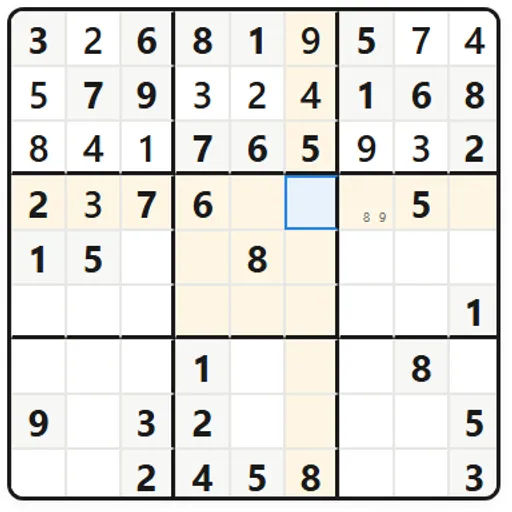
Sudoku Flow is a full-featured 9x9 sudoku with five difficulty levels, several game modes and a hint system that teaches as it helps. You place the digits 1 to 9 so every row, column and 3x3 box holds each one exactly once. It is worth playing for the Learn section and the explained hints, which make it as useful for improving as for passing time.
The Basics of a Puzzle
Gray cells are the starting clues, and they stay fixed. Select an empty cell and enter a digit with the on-screen pad or the number keys. If a digit clashes with another in the same row, column or box, the cells flash and your mistake counter goes up by one.
Notes mode lets you pencil small candidate digits into a cell. Selecting a filled cell also highlights every copy of that digit on the grid, which helps when you scan for a spot.
Scoring starts at 2,000 points. Each mistake costs 100, each hint 50, and the clock takes one point every ten seconds.
Sudoku Flow Controls
| Action | Keyboard | Mouse | Touch |
|---|---|---|---|
| Select a cell | Arrow keys | Click a cell | Tap a cell |
| Enter a number | 1 to 9 | Click a button on the number pad | Tap a button on the number pad |
| Clear a cell | Backspace or Delete | Click "Erase" | Tap "Erase" |
| Switch pencil notes on or off | N | Click "Notes" | Tap "Notes" |
| Get a hint | H | Click "Hint" | Tap "Hint" |
| Undo or redo | Ctrl+Z, or Ctrl+Y | Click the arrow buttons in the top bar | — |
| Pause | P | Click the pause button | — |
| Show all shortcuts | ? | — | — |
Choosing a Mode
New Game opens the options. Pick Easy, Medium, Hard, Expert or Insane, or set a custom clue count. Then pick a mode: Classic, Zen, Hardcore, Timed Rush or Infinite, which loads a fresh grid every time you finish one. The Daily Challenge gives everyone one medium puzzle per calendar date and tracks your streak.
What Sudoku Trains
Sudoku has no arithmetic at all, but it is still math thinking. It is pure elimination logic: you prove where a digit must go by ruling out everywhere else. That is the same reasoning used in proofs and in debugging code. The harder levels add pattern recognition, where you learn to see pairs and chains across the grid.
Steps for Cleaner Solves
- Fill the obvious singles. Find lines and boxes missing only one or two digits.
- Sweep one digit at a time. Choose a number, like 4, and check every box for its only legal spot.
- Switch on notes for Expert and up. Pencil marks make naked pairs and pointing pairs visible.
- Use hint levels in order. Level 1 only points to an area, Level 2 names a cell and its digit, and Level 3 fills it and names the technique. Set the level in Settings.
- Study the lessons. The Learn section explains singles, pairs, X-Wing and Swordfish with examples.
Handy Details
Your current grid, notes and timer save as you go, so a puzzle survives a closed tab on the same device. Best times, achievements and solved puzzles are kept in the browser too. Six color themes let you pick a calm look. For another number-logic grid with a twist, try Greater-Than Grid or Math Cage Grid.
Tested and updated: