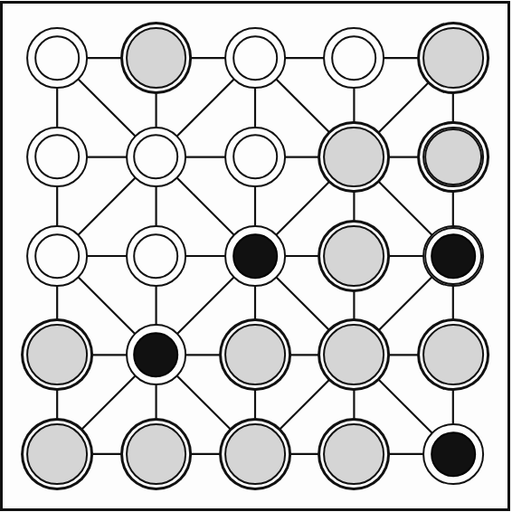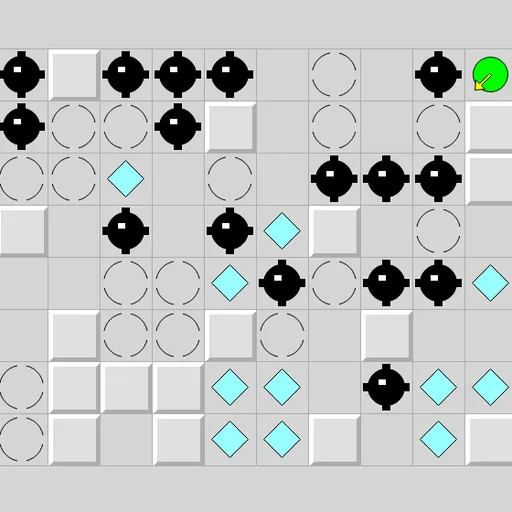
Inertia Gem Slide puts a little green ball on a grid of walls, gems, mines and stop squares, and the ball has no brakes. Once you push it, it keeps rolling until something solid stops it, scooping up gems on the way. Collect every gem without rolling onto a mine and you win. Inertia Gem Slide is Inertia from Simon Tatham’s Portable Puzzle Collection, inspired by an older Windows game by Ben Olmstead.
Reading the board
- Gray raised blocks are walls. The ball stops on the square just before one.
- Broken circles are stop squares. The ball halts on them from any direction.
- Cyan diamonds are gems. Rolling over one collects it without slowing down.
- Black spiked balls are mines. Touching one ends that move.
You can send the ball in eight directions: the four straight ones and all four diagonals. Click or tap anywhere on the grid in the direction you want, or use the arrow keys and number pad. The status bar counts the gems left. If your last gem and a mine land on the same roll, the mine wins.
Inertia Gem Slide Controls
| Action | Keyboard | Mouse | Touch |
|---|---|---|---|
| Slide up, down, left or right | Arrow keys or number pad 8, 2, 4, 6 | Left-click on the grid in that direction from the ball | Tap on the grid in that direction from the ball |
| Slide diagonally | Number pad 7, 9, 1, 3 | Left-click diagonally away from the ball | Tap diagonally away from the ball |
| Follow the hint arrow after Solve | Space | — | — |
| Undo (also after hitting a mine), redo, new grid | U / R / N | Undo move, Redo move and New game buttons | Undo move, Redo move and New game buttons |
What it trains
Every move commits you to a full path, not one step. So before you move, you have to trace a straight line across the grid, find where it ends and check everything in between. That is careful visual scanning plus forward planning, the same pair of skills you use when you plan a route on a map.
Diagonals add a geometry lesson. Two walls that touch only at their corners leave a gap a diagonal roll can slip through, so you learn to look at corners, not just sides.
Route planning tips
- Trace before you tap. Follow the line all the way to where the ball will stop, then check that path for mines.
- Hop between stop squares. They are the only places you can land exactly, so build routes around them.
- Look for diagonal gaps. They often open shortcuts the straight directions cannot reach.
- Do not trap yourself. Before entering a pocket for a gem, check that some direction will roll you back out.
- Treat undo as a scout. Undo a fatal move and try another way, but keep an eye on the death counter if you want a clean finish.
Things Worth Knowing First
Larger grids can take twenty minutes or more, while a 10x8 board is a short break. If you like puzzles where every move has to count, try Black Hole Square. For a gentler path puzzle, try Number Path.
Tested and updated: