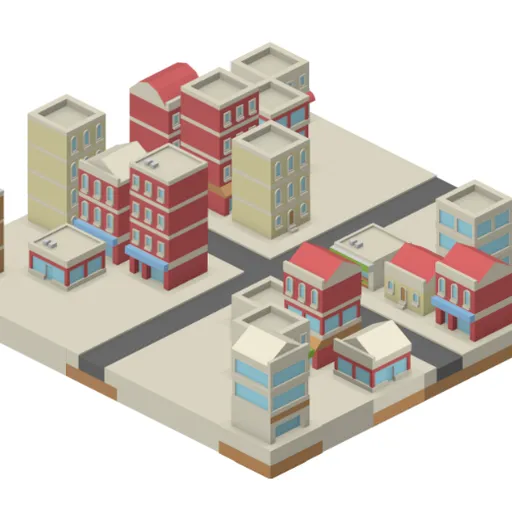
IsoCity is a quiet design toy for building a small isometric town. You get a 7x7 square of empty ground and a palette of more than seventy tiles, from crosswalks and roundabouts to canals and glass office towers. Nothing costs money and nothing can fail, which makes it a relaxing way to practice planning and spatial layout. Victor Ribeiro wrote the open-source code, and the art comes from Kenney’s free tile library.
Placing your first tiles
The palette sits beside the map. Click a tile to pick it, then click a square to place it, replacing whatever was there. Hold the mouse button and drag to paint one tile across many squares, which makes long streets quick. Right-click any square to return it to bare ground.
The palette is grouped loosely. Straight roads, crossings and tree-lined streets come first, followed by curves, bends and dead ends. Then come water channels and red wall pieces, and the last rows are buildings of different heights and styles.
IsoCity Controls
| Action | Mouse | Touch |
|---|---|---|
| Pick a tile | Click it in the palette (scroll the palette for more) | Tap it in the palette |
| Place the tile | Click a square on the map, or hold the button and drag to paint | Tap a square on the map |
| Clear a square | Right-click it | Pick the plain ground tile (first in the palette) and tap the square |
Spatial thinking in a small space
Isometric views draw a flat grid as diamonds, so up on the screen means farther away. Tiles lower on the screen are drawn on top of the ones behind them. A tall apartment block placed near the front edge can hide a whole row of shops. Learning to picture what will be hidden is the main skill here, and it is the same kind of thinking architects use with sketches and 3D views.
Roads add a second puzzle. Each road tile has fixed openings, so a corner only joins its neighbors when it faces the right way. Planning a loop of streets that connects with no gaps is a small exercise in matching edges.
Ideas for better towns
- Sketch the road network first. It is easier to fit buildings into blocks than to squeeze roads between towers.
- Put tall buildings along the back rows so shorter shops in front stay visible.
- Check each road tile’s openings in the palette picture before placing it next to another road.
- Frame areas with water. A line of canal tiles makes a clean edge for a park or a waterfront.
- Vary building heights so the skyline has steps instead of a single flat wall.
- Set yourself a challenge, such as a town where every building touches a road or one with no dead ends.
Things Worth Knowing First
IsoCity works well with taps on phones and tablets, and a hover diamond on desktop shows which square you are about to change. There is no session length; you can stop any time and your town is still there. For something with more rules and growth, try Evolving Civilization.
Tested and updated: