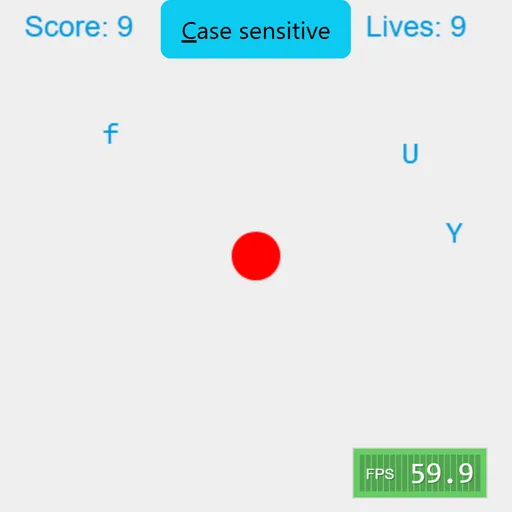
Typer Defense is a fast keyboard game with one goal: protect a red circle in the middle of the screen. Single letters slide in from the left and right edges, each at its own speed, and a correct key press bursts them into colored dots. Typer Defense, based on Berk Erol’s open-source Typer, trains quick key recognition and calm focus rather than spelling or math.
How a run goes
Letters appear at random heights on both side edges and travel straight toward the core. Press the matching key and that letter pops, adding a point. Press a key that matches nothing and you lose a point. Let any letter reach the circle and you lose one of your 10 lives, shown at the top right, and the screen clears.
By default the game is case sensitive. Capital letters only count with Shift held, and small letters only count without it. A button at the top turns this off, and then only small letters appear. Esc pauses at any time.
Typer Defense Controls
| Action | Keyboard | Mouse |
|---|---|---|
| Destroy a letter | Press the matching letter key | — |
| Type an uppercase letter | Shift + the letter | — |
| Pause or resume | Esc | — |
| Switch case sensitive on or off | — | Click the "Case sensitive" button |
What it actually trains
This is not a math game, and that is fine. It trains three things: finding keys without looking, reacting quickly to what you see, and choosing which threat to handle first. That last one is a small planning skill. A slow letter near the edge can wait, while a fast one halfway in cannot.
Case sensitive mode adds a layer of control. Your hands have to decide between two actions for the same key, which is good practice for coding, where capital letters matter.
Strategy for longer runs
- Scan both sides, not only the side where the last letter came from.
- Handle the letter closest to the core first, then the fastest.
- If the same letter appears twice, press it twice. One press only clears one copy.
- Rest your fingers on the home row so every key is a short reach.
- Start with case sensitivity off, then turn it back on when you stop looking down.
- Pause with Esc if a big wave arrives and you need a breath.
Practical Notes for Players
You need a physical keyboard, since phones and tablets do not open their keyboard for this game. Runs can last as long as your focus holds, so it suits short breaks well. For a coding game that also uses the keyboard heavily, try Learn Git Branching or the selector puzzles in CSS Diner.
Tested and updated: