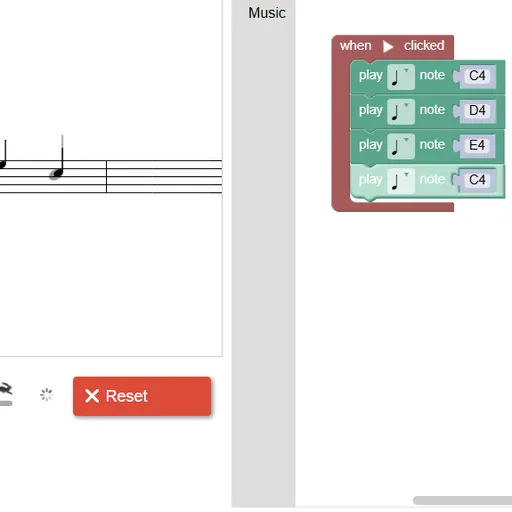
Block Code Music is a coding game where your program is a song. Instead of steering a character, each block plays a note, and a staff on the left fills in black notes as your code runs. Block Code Music is a smart way to learn functions, because a melody full of repeated phrases makes the reason for them obvious the moment you hear it.
How a level works
Everything starts inside a “when Run clicked” block. You drag “play note” blocks into it, set each pitch on a tiny staff and pick a length. Press Run Program and the music plays. The gray notes on the big staff are the target, so you can see which ones you are still missing.
When your notes match, the game shows the JavaScript your blocks became and offers the next level. If something is off, Reset stops the sound at once and you can fix the block that went wrong.
The levels grow in a clear order:
- Level 1 asks for four notes.
- Level 2 asks you to play them twice with no new note blocks, which means building a function.
- Following levels add more functions for the other phrases.
- Then come instruments, rests and several start blocks running at the same time.
- The last target levels combine all of it into a four-part round, and level 10 is open composing.
Block Code Music Controls
| Action | Keyboard | Mouse | Touch |
|---|---|---|---|
| Add note, rest or function blocks | — | Click the Music category and drag a block into the workspace | Tap the category and drag a block |
| Choose a pitch | Type a note name such as D4 and press Enter | Click the note name and pick a line on the small staff | Tap the note name and pick a line |
| Choose a note length | — | Click the note symbol on the block | Tap the note symbol |
| Play or stop your tune | — | Click Run Program, then Reset | Tap Run Program, then Reset |
| Change playback speed | — | Drag the tempo slider | Slide the tempo control |
Why music is a good fit for code
Songs repeat. A phrase plays, plays again, and then the next one does the same. A function captures that pattern: you define a block of notes once, give it a name, and call it wherever it belongs. That is exactly how programmers avoid copying the same lines over and over.
The round adds a second idea, running code in parallel. Several start blocks fire together, and rests shift each voice so it begins a little later. Getting four voices to line up is a good lesson in timing and in thinking about more than one process at once.
There is a bit of music theory too. You learn note names like D4 and G4 and see how note lengths add up across a measure.
Tips from the staff
- Give each function a short name that matches its phrase, like “part one”.
- Compare your notes with the gray targets one at a time when a level will not pass.
- If one note should be longer, change its length rather than playing it twice.
- Slow the tempo slider down when you need to hear exactly where a voice drifts.
- Pick a different instrument for each voice in the round so the parts stand apart.
Try next
For another program you can watch as well as hear, Block Code Turtle Art uses the same block editor to draw shapes. If you want to move from blocks to text, Block Code Duck Pond switches to JavaScript halfway through.
Tested and updated: