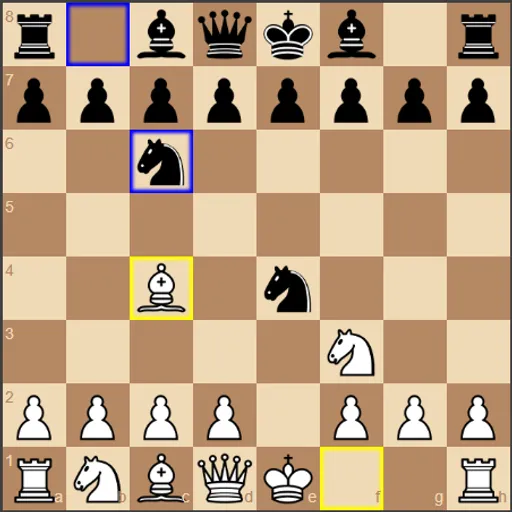
Chess vs Computer lets you play White against a small chess engine written by Zhang Zeyu. You move, the engine thinks, and Black replies, with checkmate as the goal. What makes it useful for learning is how openly it works: it shows its search depth, how many positions it checked, and a live bar that scores the position after every move. You can set the engine from a gentle depth 1 to a careful depth 5.
Making moves
Standard chess rules apply, including castling, en passant, check and checkmate. Drag a piece to a square and release it. Illegal moves snap back. With a mouse, hovering over a piece shades its legal squares.
Your last move is outlined in yellow and the engine’s reply in blue. The Status line reports check and how a game ends: checkmate, stalemate, threefold repetition, the 50-move rule or too little material to mate. Undo takes back your move and the reply together, and Redo steps forward again.
Chess vs Computer Controls
| Action | Mouse | Touch |
|---|---|---|
| Move a piece | Drag the piece to its new square | Drag the piece to its new square |
| Preview legal moves | Hover over one of your pieces | — |
| Take back your last move and the reply | Click "Undo" | Tap "Undo" |
| Replay moves you took back | Click "Redo" | Tap "Redo" |
| Change engine depth or turn on hints | Open "Settings" and pick a value or tick the box | Open "Settings" and pick a value or tick the box |
| Load an opening or restart | Open "Opening Positions" and click a button | Open "Opening Positions" and tap a button |
How the engine thinks
The engine uses minimax search with alpha-beta pruning. Minimax means it imagines its move, then your best answer, then its best answer to that, and so on, down to the chosen depth. It picks the move that leaves it best off if you play perfectly. Alpha-beta pruning skips lines that cannot change the result, which saves time. Each extra level of depth multiplies the work, which is why depth 5 is slow.
Learning plan
- Win at a low depth first. Beat depth 2 a few times before moving to 3 or 4.
- Watch the score after each move. A sudden drop usually means a hanging piece.
- Use the suggested move. Tick the hint box in Settings to see the engine’s choice for White outlined in red, then decide if you agree.
- Study openings. Buttons drop you into the Ruy Lopez, Italian Game or Sicilian Defense.
- Replay with Undo. Try a new idea from the same spot and compare the score.
Setup and Device Notes
On a narrow screen the menus stack above the board, so scroll inside the game frame to reach it. Dragging works with a finger. For a chess relative with a twist, try Shogi or Xiangqi. For something lighter, play Checkers.
Tested and updated: