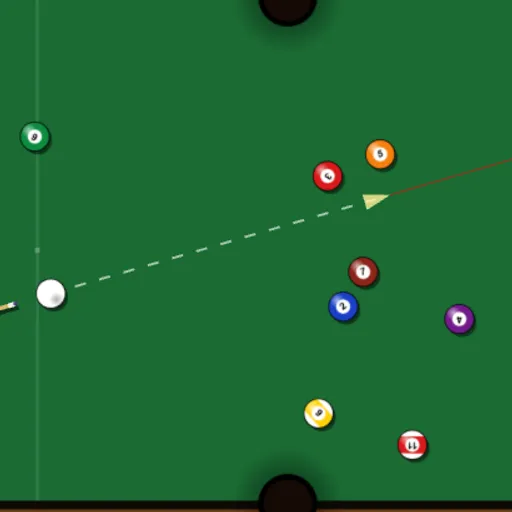
Pocket Pool is a solo billiards challenge on a six-pocket table. You break a full rack of fifteen balls and try to sink every one in as few shots as possible. There is no opponent, so you play only against your own best count. Pocket Pool runs on the Box2D physics engine, which makes it a realistic place to practice angles and cue ball control. Frank Force built it with LittleJS.
Running a rack
Press Play and the rack sits at the far end with the cue ball behind the head string. Aim, set power and shoot. Counters at the top show your shots, your best result and how many balls remain.
A dotted line with an arrow shows the direction and strength of the shot, and a power percentage appears below the table. A thin red sight line runs straight ahead, but it does not show bounces, so you still judge the angles yourself.
If the cue ball drops, you get ball in hand once everything stops. Sink the last ball for the cleared-table message and, if you beat your record, a new best. Press R for a fresh rack.
Pocket Pool Controls
| Action | Keyboard | Mouse | Touch |
|---|---|---|---|
| Aim and set power | — | Point where the cue ball should go; farther from the ball means more power | Press and drag behind the cue ball; pull farther back for more power |
| Shoot | — | Left click | Lift your finger |
| Fine-tune power | — | Scroll the wheel (up adds power, down removes it) | — |
| Fast-forward rolling balls | — | Hold the right button | — |
| Place the cue ball after a scratch | — | Move to a spot and click | Drag to a spot and lift your finger |
| Start a new rack | R | Menu icon, then New Rack | Menu icon, then New Rack |
| Pause | Esc | Click the menu icon (top right) | Tap the menu icon (top right) |
Geometry on the felt
When the cue ball strikes an object ball, the object ball travels along the line between their centers at the moment of contact. To sink a ball, you picture a ghost ball touching it on the side away from the pocket, then aim the cue ball at that spot. That is applied geometry, and the same rule good players use in real pool halls.
Cushion bounces follow the angle-in, angle-out rule, and spin from the physics engine adds small changes. Planning where the cue ball stops after a shot is the step that separates a good clear from a slow one.
Tips for a low count
- Hit the break hard to spread the pack and maybe drop a ball.
- Tap gently on balls sitting in a pocket’s mouth.
- Before each shot, decide where you want the cue ball to stop.
- Use ball in hand to set up the easiest straight shot on the table.
- Pick shots that leave the cue ball near the middle, where it has options.
- Hold the right mouse button to fast-forward long rolls.
Practical Notes for Players
Your fewest shots for a cleared rack are saved in your browser. A rack can take anywhere from a few minutes upward, depending on how careful you are. For more angle work, try Mini Putt Park. For a different physics puzzle, aim around planets in Gravity Golf.
Tested and updated: