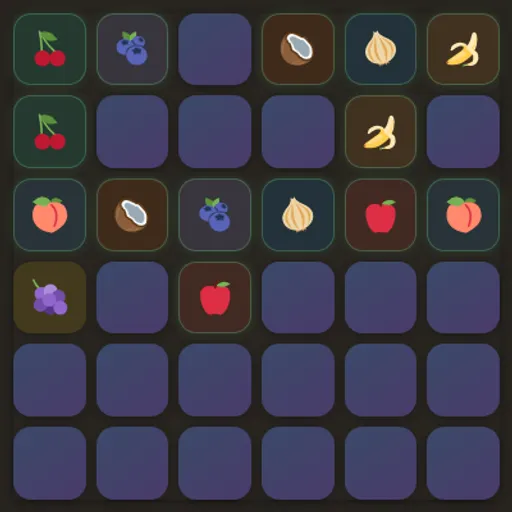

Memory Pairs is a classic concentration game with a dark, tidy look and three board sizes. Each face-down card hides a food picture, such as a pear, a croissant or a chili, and each picture appears on exactly two cards. Flip two at a time and try to remember what you have seen. Memory Pairs is a clean way to train short-term memory, and it tracks both your moves and your time.
How a round works
All cards start face down. Pick one to flip it, then pick a second. If the pictures match, both stay face up with a soft color tint. If not, they turn back over after a short pause.
The clock starts on your first flip and stops when the last pair is found. A message then shows your total moves and seconds. Choose 4x4, 6x6 or 8x8 from the menu below the board to start a fresh shuffle at that size, or press New game to reshuffle the current one.
Memory Pairs Controls
| Action | Keyboard | Mouse | Touch |
|---|---|---|---|
| Flip a card | Tab to a card, then Enter or Space | Click a card | Tap a card |
| Start a new shuffled board | — | Click "New game" | Tap "New game" |
| Change the board size | — | Pick 4×4, 6×6 or 8×8 from the menu | Pick 4×4, 6×6 or 8×8 from the menu |
| Open or close the help window | Esc or Q closes it | Click "? man" to open, click outside to close | Tap "? man" to open, tap outside to close |
The memory skill behind it
Memory Pairs trains working memory, the mental notepad you use to hold information for a short time. On the 4x4 board you only need to track a handful of positions. On 8x8 there are 64 cards, far more than most people can hold at once, so you need strategies like grouping by row or linking a picture to a spot.
There is also a little probability. Early in a round, any new card is unlikely to match something you have seen. Later, every new flip has a much better chance of finding its partner. Knowing when to explore and when to cash in is a real decision skill.
Tips for fewer moves
- At the start, always flip cards you have not seen yet.
- If your first flip shows a picture you remember, go straight to its partner.
- Work across the board in rows so positions are easier to recall.
- Say the picture and its row in your head, like “pear, top row, third”.
- Use the tint color of matched pairs as a second clue.
- Pick one goal per round. Racing the clock and keeping moves low pull in different directions.
Before You Press Play
The board shrinks to fit any screen, and the 4x4 size gives the biggest cards on a phone. A short help window opens on your first visit and stays one click away. Keyboard players can move with Tab and flip with Enter or Space.
For a different kind of matching that rewards planning, try Mahjong Solitaire. If you want numbers in the mix, Pyramid Solitaire matches cards that add to 13.
Tested and updated: